
Playground: Child Care App
After School DevelopmentEducation
4.9137.00 Reviews
- Version
- 3.3.0
- Installs
- 100.00K
- Age Rating
- Everyone
Screenshots
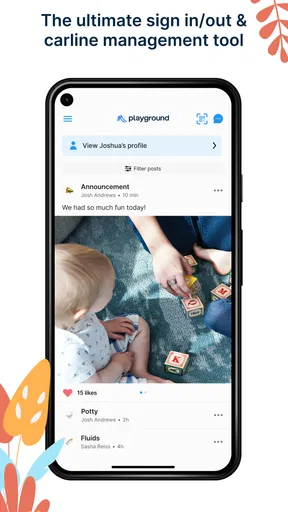
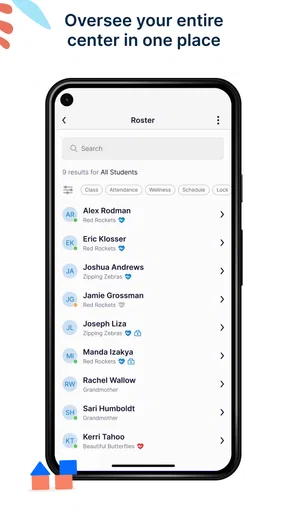
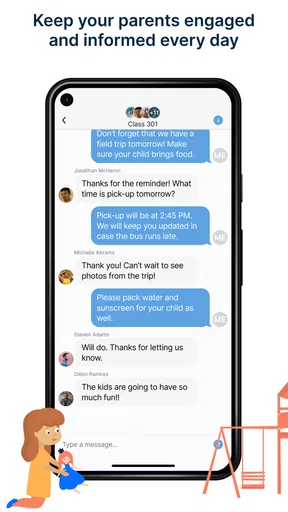
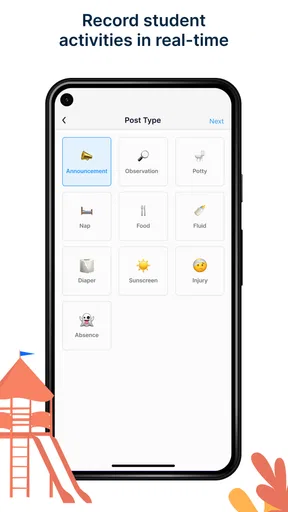
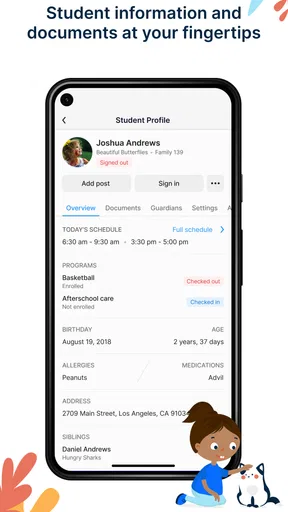
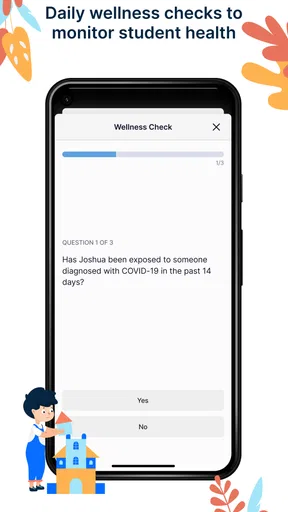
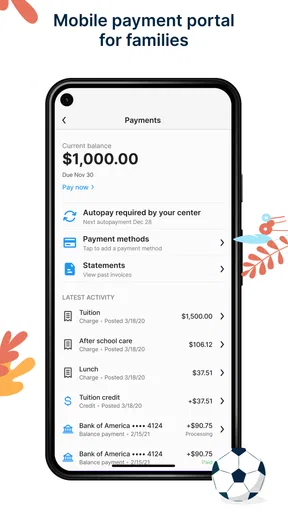
Our Review of Playground: Child Care App
 Analysis by Appyee
Finding dependable child care is rarely just a matter of filling in a calendar. Families also need a simple way to keep track of arrangements, communicate the practical details, and avoid the small misunderstandings that become stressful on busy days. Playground: Child Care App approaches that problem as an education-focused tool from After School Development, with a straightforward idea behind it: make child care easier to organize without turning it into another complicated system to learn.
After spending time with the app, my overall impression is positive but specific. Playground works best as a focused coordination tool for families and child-care settings, not as a complete replacement for every communication, scheduling, payment, or learning platform a parent might already use. Its appeal comes from keeping the child-care context at the center rather than trying to become a general-purpose productivity app.
The app is free, suitable for Everyone, and available for devices running Android 8.0 or later. Its current version is 3.3.0, and it has passed the point where it feels like an obscure experiment: more than 100 thousand installations and an average rating of 4.9 from around 1.5 thousand ratings suggest that many users find the basic approach useful. Those figures do not guarantee that it will fit every family, but they do make it worth examining if you want a dedicated child-care companion.
How Playground fits into everyday child care
I judge child-care apps by whether they make handoffs and routine changes easier to understand, not by how many tools they try to combine. Playground is worth considering when several adults need one shared reference point, and that decision leads naturally to the more important question: whether its focused approach matches the way your family already organizes care.
A focused alternative to scattered messages
The first strength I noticed is the app’s narrow purpose. Parents often manage child-care information across text messages, email threads, paper notes, shared calendars, and conversations at pickup time. Each method can work on its own, but the details become difficult to find when several people are involved. An app built specifically around child care can reduce that mental switching, especially when the same information needs to be understood by a parent, a caregiver, and possibly other adults responsible for the child.
That focus also makes Playground easier to explain to someone who is not especially comfortable with technology. A general calendar may be more powerful, while a messaging service may offer richer conversation tools, but both can require users to decide how to organize child-care information themselves. Playground’s value is that the child-care situation gives the app a clearer starting point. I would rather introduce a caregiver to one purpose-built space than ask them to learn a collection of unrelated tools.
This is particularly useful for routines that repeat but still need occasional changes. A normal week might involve one adult handling morning drop-off, another collecting the child later, and a different arrangement on a particular day. The practical challenge is not only remembering the plan; it is making sure everyone is working from the same version. A dedicated child-care app can act as a shared reference point instead of leaving the latest detail buried in a conversation.
A realistic weekday example
Imagine a parent who has an early meeting and needs to adjust the afternoon arrangement. Rather than relying on a message sent while several other conversations are active, the parent can use the child-care app as the place to organize the relevant information. The other adult involved knows where to look, and the caregiver has a clearer context for the change. That does not eliminate the need for direct communication when something is urgent, but it can make ordinary planning less fragile.
I also see value for families whose schedules are not identical from week to week. A fixed paper note is easy to overlook when the plan changes. A generic calendar may show an event but not feel connected to the wider child-care routine. Playground sits between those approaches: it is more structured than a casual message, while remaining more focused than a full productivity suite.
The important insight is that the app is most useful when it becomes a habit for recording decisions, not merely a place to check after confusion has already occurred. Families should agree on what belongs in the app and what still deserves a phone call or direct message. That small agreement prevents the common mistake of assuming that installing a coordination tool automatically creates coordination.
Where the developer’s focus helps
After School Development is presented as the developer, and the app’s identity feels closely tied to child care rather than broad personal organization. That matters because the best tool for a family is not always the one with the longest feature list. A child-care setting may prefer a simpler workflow that several adults can understand quickly, especially when not everyone wants to manage a complicated digital system.
For a parent, this focus can make the app feel less distracting than a larger platform. A general family organizer might include shopping lists, chores, appointments, and household tasks, but those extras can make it harder to see the information that matters at pickup time. Playground is easier to judge: if you want a child-care-centered place for staying organized, it has a clear reason to exist.
The strongest practical benefits
The most convincing benefit is reduced ambiguity. Child care involves handoffs, and handoffs are where small gaps in communication become real problems. A tool that gives adults a shared routine can help everyone distinguish between the usual plan and a one-day change. That is more valuable than visual polish alone.
Another strength is accessibility. Because the app is free and carries an Everyone age rating, it is approachable for families who do not want to commit money before understanding whether it fits their routine. Free access also makes it easier for a child-care environment to suggest the same tool to multiple families without creating an immediate financial barrier.
The app’s rating is also encouraging in context. An average of 4.9 from around 1.5 thousand ratings indicates strong user satisfaction, while the 137 written reviews give prospective users more than a single isolated opinion to consider. I would still treat ratings as a starting point rather than proof that every workflow is perfect. High scores tell me that the central experience is landing well for many people; they do not tell me whether the app matches a particular family’s communication style.
Useful habits that make a difference
One practical tip is to establish a single source of truth before the first busy week begins. If one adult continues using text messages while another relies on Playground, the family can end up with two competing versions of the plan. Decide which routine details belong in the app, then use direct messages only for urgent exceptions or questions that need a personal reply.
A second tip is to review the next day’s arrangement at a calm moment rather than during the handoff itself. Child care often involves noise, time pressure, and interruptions. Checking the plan the evening before gives adults a chance to notice an inconsistency while there is still time to resolve it. This is a workflow advantage, not a special feature claim: the app becomes more effective when users treat it as preparation rather than emergency repair.
A third useful approach is to keep recurring arrangements and unusual changes mentally separate. The normal schedule should remain easy to understand, while a temporary adjustment should be clearly recognized as temporary. If a family regularly changes the routine without cleaning up old assumptions, even a dedicated app can become confusing. Playground can support organization, but it cannot decide which arrangement is still valid unless the people using it maintain that clarity.
The meaningful limitation
The same focus that makes Playground approachable may limit it for families looking for an all-in-one platform. Child care is connected to calendars, school announcements, medical information, transportation, payments, and household planning. If you want one application to combine all of those areas, a broader family organizer may be a better fit. Playground is easier to understand when you view it as one dependable layer of the routine rather than the entire digital life of a household.
There is also a social limitation: the app only helps when the relevant adults actually use it consistently. A parent may be ready to organize everything digitally, while a caregiver or another family member may prefer familiar messages or verbal reminders. That mismatch can reduce the benefit quickly. Before relying on Playground, I would make sure the people involved are willing to check the same place and agree on how updates should be handled.
Another point is that a high rating can create expectations that the app will solve every child-care problem. It cannot replace judgment, immediate contact, or responsible supervision. For a last-minute emergency, a direct call remains more appropriate than waiting for someone to notice an update. The app is strongest for planned coordination and shared understanding, not for situations where seconds matter.
Who should use it
I would recommend Playground first to parents and caregivers who regularly coordinate handoffs, changing schedules, or shared routines and want something more purposeful than a stream of messages. It is also a sensible option for people who find large productivity apps overwhelming. The child-care focus gives them a clearer reason to open the app and a smaller set of decisions to make.
It may be especially helpful when several adults share responsibility but do not all live in the same household. In that situation, the difficulty is often not the number of appointments; it is keeping everyone aligned about who is doing what. A dedicated child-care space can make that arrangement easier to follow, provided everyone agrees to use it.
I would be more cautious about recommending it to someone who already has a well-established family calendar and communication system that everyone checks reliably. Adding another app can create duplication instead of reducing it. If your existing setup already handles child-care changes clearly, Playground may not offer enough additional value to justify changing habits.
I would also steer away from it if your main requirement is advanced household management, detailed educational tracking, or a broad communication platform. Those needs call for tools designed around those functions. Playground’s strength is its child-care orientation, and choosing it makes the most sense when that is the problem you are actually trying to solve.
What to expect when getting started
Since the app is free, the initial decision is not about subscription cost; it is about whether the workflow fits your household. I would begin with one real routine rather than trying to move every child-care detail into the app immediately. Use it for the most common handoff or recurring arrangement, then see whether the adults involved find the shared process clearer than their previous method.
It is also worth checking device compatibility before planning a wider rollout. The minimum requirement is Android 8.0, so older devices may not be suitable. For families using newer phones, that requirement should be manageable, but child-care settings sometimes involve shared or aging devices, making compatibility a practical consideration rather than a technical footnote.
The Everyone content rating makes the app broadly approachable, but adults should still decide what information is appropriate to place in any child-care tool. Good digital organization includes restraint: record what helps coordinate care, avoid unnecessary sensitive details, and make sure everyone understands who is expected to see the information.
My final assessment
Playground: Child Care App succeeds because it does not need to compete with every calendar, chat service, or family organizer. Its clearest role is helping people manage child-care arrangements in a more deliberate way. In my experience, that is a worthwhile distinction: the app is most valuable when the problem is scattered information and uncertain handoffs, not when the problem is a lack of general-purpose digital tools.
The free price, broad age rating, current 3.3.0 release, and strong average rating make it an easy option to try. Its audience is not everyone, though. Families that need a complete household-management system may outgrow its focused approach, and families that cannot agree on a shared workflow may see little improvement.
My recommendation is therefore clear but measured: try Playground if your child-care routine depends on several adults and your current system is a mixture of messages, memory, and paper notes. Use it as the agreed place for planned arrangements, keep urgent matters in direct contact, and review whether it genuinely reduces confusion after a week or two. For the right family, its simplicity is the feature—not a missing ambition.
As an education app from After School Development, it offers a practical answer to a very everyday problem. It will not replace human communication or careful responsibility, but it can make the ordinary parts of child care easier to see and easier to share. That is a modest goal, and in this case, a useful one.
Verdict
Strengths of Playground: Child Care App
- Simple activities help children learn through play.
- Bright visuals and friendly characters keep young users engaged.
- Parents can choose age-appropriate activities with ease.
- Offline access makes it useful during travel or without Wi-Fi.
- Clean interface is easy for children to navigate independently.
Limitations of Playground: Child Care App
- Some activities may become repetitive after frequent use.
- The app may offer limited value for older children.
- Certain features or content may require in-app purchases.
- Parents may need to supervise screen time and activity choices.
- Performance can vary on older phones or tablets.
Similar Picks in This Category
View All
Duolingo: Language Lessons
Duolingo4.7

Google Classroom
Google LLC2.8

Unacademy: Learn & Crack Exams
Unacademy3.2

Bible App for Kids
Life.Church4.4

Cake - Learn English & Korean
Cake Corp.4.7

Brainly: AI Homework Helper
Brainly4.5
Frequently Asked Questions
What is Playground: Child Care App, and who is it designed for?
Playground: Child Care App is designed to help parents and caregivers organize, manage, and monitor childcare activities in one place. Depending on the available features, it may support routines, schedules, reminders, communication, activity tracking, and important child-related information. It can be useful for families, babysitters, nannies, and childcare providers who want a more structured way to coordinate daily care.
Is Playground: Child Care App suitable for different ages and childcare routines?
The app may be useful for a range of childcare situations, but its suitability depends on the child’s age and the routine you need to manage. Parents should review the available categories, reminders, activity tools, and customization options before relying on it. It can support everyday organization, but it should complement—not replace—direct supervision, professional medical advice, or responsible adult judgment.
Does Playground: Child Care App require an internet connection?
Some functions may work without a constant internet connection, such as viewing previously saved information or checking certain schedules. However, features involving account synchronization, shared updates, cloud storage, notifications, or communication with other caregivers may require Wi-Fi or mobile data. Before downloading, check the app’s store description and test its offline behavior if reliable access is important to your family.
Is my child’s personal information safe in Playground: Child Care App?
Because a childcare app may contain sensitive information, including names, routines, notes, schedules, or contact details, privacy should be considered before creating an account. Read the developer’s privacy policy to understand what data is collected, how it is stored, and whether it is shared with third parties. Use strong passwords, limit access to trusted caregivers, and avoid entering unnecessary personal information.
Is Playground: Child Care App free to download, and are there in-app purchases?
The app may be available as a free download, but some features can be restricted behind subscriptions, premium upgrades, advertisements, or other in-app purchases. Pricing and included tools may differ between Android and iOS. Check the current store listing before installing, especially if multiple caregivers need access or if you require advanced scheduling, sharing, storage, or communication features.
